In an age of technology, travel lovers and we ourselves are constantly looking for convenient, good-value ways to book flights. Skyscanner has become a favourite platform for us, giving us a smooth search for the best deals. In this article we’ll go through the Skyscanner comparison site in depth and explore how to make the most of it, so that in the end you have the flights you wanted at the best price!
How Skyscanner works
The search engine gathers flight information from various airlines and travel agencies and lets users compare prices and find the best deals. It’s a flight aggregator, which means it doesn’t sell any flights itself – it compares prices from hundreds of airlines and sellers and shows you where to buy most cheaply. It’s a kind of “Google for flights”.
To start searching and comparing on Skyscanner, simply visit the website or download the app from the App Store or Google Play.
How to use Skyscanner
Once you’re on the site (not logged in, just with the site or app loaded), enter your departure and arrival points along with your travel dates and let Skyscanner do the rest. Make sure you enter your specific preferences so you get accurate results.
Skyscanner lets you filter the results based on various factors such as direct flights, stopovers and preferred airlines. It’s a comprehensive tool designed to simplify the flight booking process and give users all the information they need at their fingertips.
Another good feature is that you can add nearby airports around the departure airport you’ve chosen.

Flexible date options for saving money
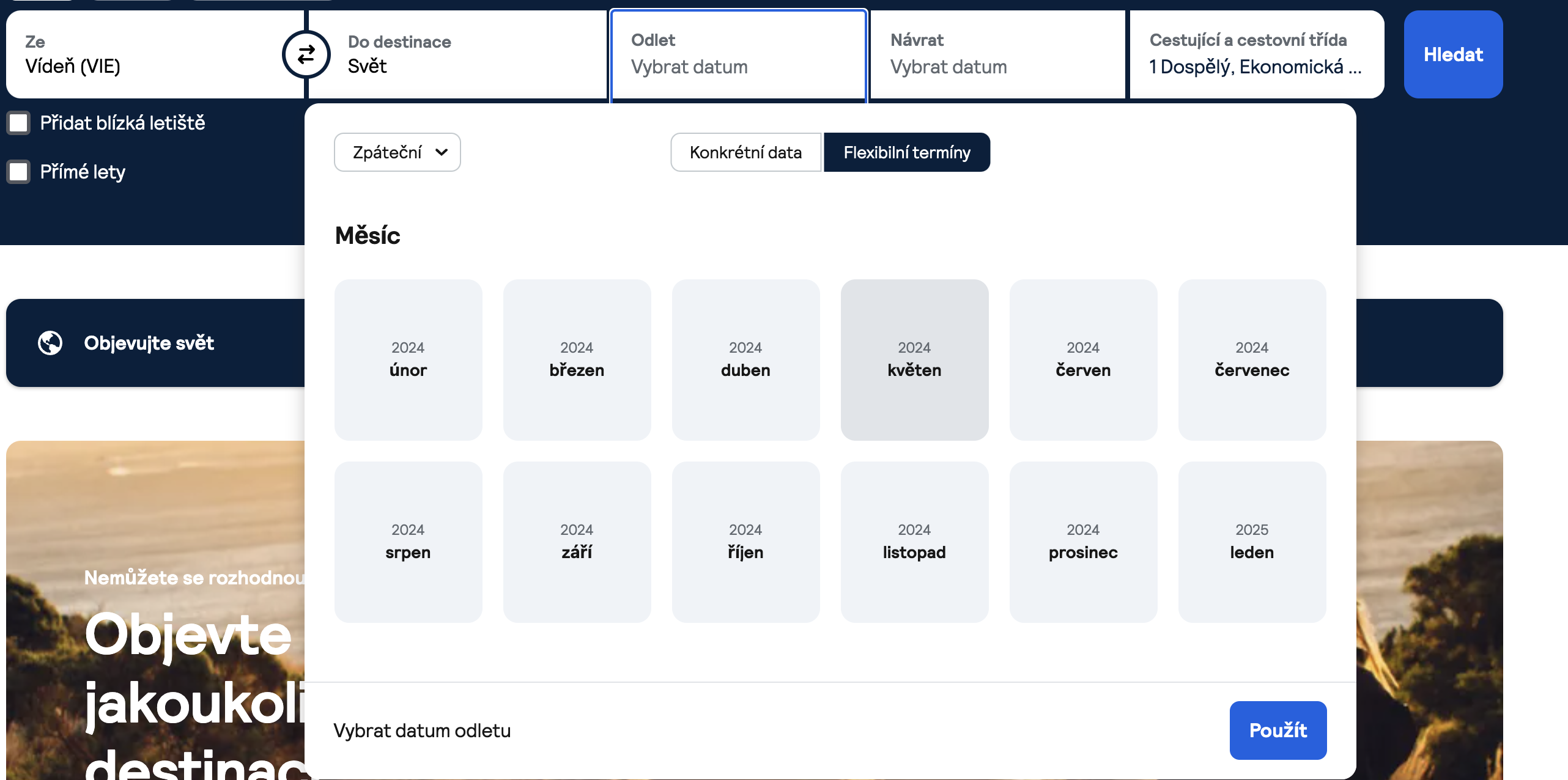
One of Skyscanner’s strengths is its flexibility in choosing departure and return dates. Travel plans can be flexible, and being open to adjusting your departure or return date can lead to significant savings on the ticket price. Skyscanner makes that easy by offering the “Flexible dates” option during the search. This feature lets you see prices for a whole month or even a year, helping you identify the days when flying is best value.
Using the flexible date feature doesn’t only save money, it also opens up the possibility of spontaneous travel. Whether you’re planning a weekend break or a longer holiday, flexible options let you make informed decisions that fit your budget and preferences.
The Explore Everywhere feature for adventurous travellers
For those who plan their trips more spontaneously, or rather don’t mind where they fly as long as they fly, the “Explore Everywhere” feature is ideal. It lets you search for flights without entering a specific destination. Instead you enter your departure city and travel dates, and Skyscanner gives you a list of affordable destinations around the world.

Use the “everywhere” feature during shoulder seasons, for instance, when you can visit sought-after destinations outside the main season.
The MULTI CITY search feature for combined tickets
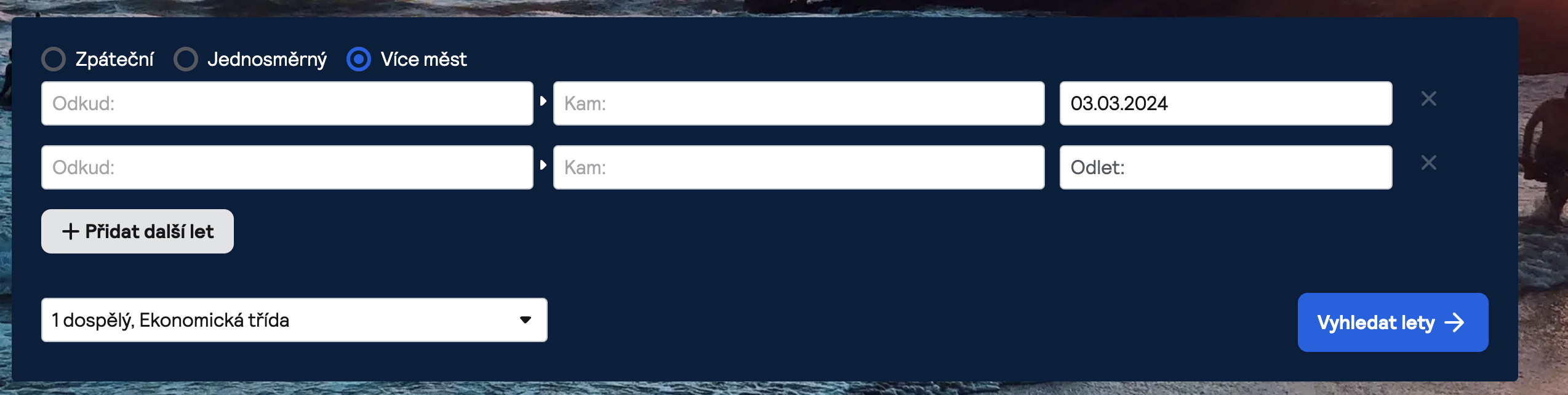
Globalisation is most visible in how countries connect, and it’s the same when searching for flights. There can be situations where you’re looking for cheap flights to Southeast Asia but can’t find any. In that case you can fly to a bigger city (Singapore, for instance) and from there fly to your chosen destination (Bali, say). The multi-city feature lets you combine flights like that. You’ll immediately see the prices, dates and airlines you’ll fly with.
In the opening menu, just click “Multi-city search” in the “To” field and the interface will switch automatically.
Setting price alerts for the best deals
For those who like to watch prices before deciding to buy, Skyscanner offers a convenient solution – price alerts. Setting price alerts for specific routes and travel dates means you’ll get notified about significant changes in fares.
To set up price alerts on Skyscanner, simply enter your desired route and travel dates, then click the “Get price alerts” button. To receive the alerts you have to sign in – you can do that with your email or an Apple or Google account.
Skyscanner will notify you by email or push notification whenever prices fluctuate on your chosen route. This feature is especially valuable for those on a tight budget who are willing to wait for the right moment to book. For me it’s a bit of a flight gamble. 🙂
Consider the Skyscanner travel blog for travel information
Skyscanner doesn’t stop at providing a platform for booking flights – it also offers valuable insights and information through its own travel blog. The blog covers a wide range of topics, from destination guides and travel tips to the latest trends in the aviation industry.
What to watch out for when buying flights via Skyscanner
Skyscanner doesn’t sell tickets, it only redirects you to sellers and directly to carriers. Before buying, check the seller using reviews (Trip.com, Gotogate and MyTrip have mixed reviews, for instance). Watch the baggage terms – budget airlines like to charge for cabin bags separately. Very much so!
Summary
Skyscanner isn’t just a flight booking platform, it’s a comprehensive tool. Clear and, above all, user-friendly. We use it for almost every search. I also like that it doesn’t rest on its laurels and keeps adding features. Such as the option to lock in a price for a while (handy mainly for cheap flights around Europe or cheap long-haul tickets). That’s still in testing, though, and only shows for some users.
I recommend Skyscanner to everyone who asks me how to search for flights – I even told my dad about it, and he struggles to turn a computer on. So I’m happy to recommend it to you too.
We hope this guide has been informative and useful. If you have any tips or experiences with Skyscanner flights, do share them.
And actually, why wait? Start searching right now! Happy, comfortable travels. 🙂
📌 Are you getting ready for your next adventure? Don’t waste time searching for information. Create your own itinerary with Karel 2.0, a tool that will plan and recommend places tailored to your schedule and the area you’ve selected. 🙂 Let’s try it